Smart home air purifiers have become essential tools for homeowners concerned about indoor air quality. Unlike traditional purifiers, these connected devices let you monitor and control air cleanliness from your phone, set automated schedules, and integrate with your home’s ecosystem. Whether you’re managing allergens, pet dander, or pollution from nearby traffic, a smart home air purifier adapts to your space’s needs in real time. This guide walks you through what these devices do, which features actually matter, how to set them up, and how to keep them running smoothly for years of cleaner air.
Table of Contents
ToggleKey Takeaways
- Smart home air purifiers monitor and control indoor air quality remotely through smartphone apps, eliminating guesswork about what you’re breathing.
- Real-time air quality monitoring with color-coded AQI readings helps you track pollutants like PM2.5, VOCs, and CO₂ while watching your purifier work in real time.
- WiFi connectivity and voice assistant integration let you turn your smart air purifier on or off remotely, adjust fan speeds, and receive filter replacement alerts from anywhere.
- Replace filters every 3 to 6 months depending on air quality and usage, and avoid cleaning HEPA filters—they’re designed for single use only.
- Proper placement in a central, unobstructed location with intake vents clear is critical; most units effectively cover 300–800 square feet and operate quietly at 20–50 decibels.
- A well-maintained smart home air purifier remains reliable and cost-effective for 5+ years with simple monthly exterior cleaning and predictable filter replacement cycles.
What Is a Smart Home Air Purifier?
A smart home air purifier is a connected device that removes contaminants from indoor air while giving you remote monitoring and control through a smartphone app or voice assistant. It draws air through mechanical filters, typically a HEPA (High-Efficiency Particulate Air) filter for fine particles and an activated carbon filter for odors and gases, then circulates cleaned air back into your room.
The “smart” part means the purifier tracks air quality metrics, learns your usage patterns, and can trigger alerts when filters need replacing. Unlike conventional purifiers that sit silently in a corner, a smart model communicates with you. Some units sync with your home automation system, so they turn on automatically when your smart thermostat detects poor air quality or when you arrive home.
These devices come in various sizes, from compact units for bedrooms to whole-home systems integrated into HVAC ductwork. Most cover between 300 and 800 square feet effectively, depending on the model’s Clean Air Delivery Rate (CADR) rating. That spec tells you how fast the unit purifies air for specific pollutants: higher numbers mean faster cleaning. Modern smart purifiers typically run quietly, most between 20 and 50 decibels, so they won’t disrupt sleep or conversation.
Key Features That Matter
Real-Time Air Quality Monitoring
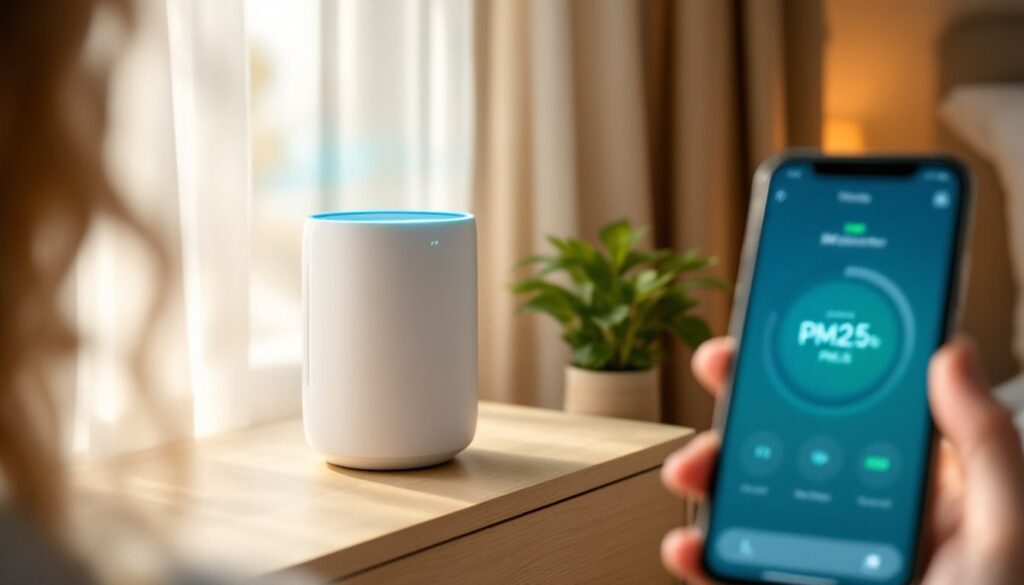
The most useful feature of a smart purifier is its ability to detect and display air quality metrics in real time. Look for a model with a built-in sensor that measures particulate matter (PM2.5 and PM10), volatile organic compounds (VOCs), and sometimes CO₂ levels. The app will show you a color-coded Air Quality Index (AQI) that shifts from green (healthy) to red (concerning), updating every few minutes.
This transparency matters because you can see whether your purifier is actually working. When you run the unit in a dusty workshop or a room with fresh paint fumes, watch the AQI drop in real time, that’s satisfying and practical. Some units display air quality directly on a small screen mounted on the device itself, so you don’t need to open your phone every time you want a reading. The data also helps you decide when it’s safe to open windows and let stale air out, or when to keep doors closed during high pollen days.
WiFi Connectivity and App Control
WiFi connectivity is what makes a purifier truly “smart.” A connected unit lets you turn it on or off remotely, adjust fan speeds, check filter status, and receive alerts when maintenance is due, all from your phone. You’re not tied to being in the same room, so you can activate the purifier before arriving home or turn it off when you leave to save energy.
Many smart purifiers also work with voice assistants like Alexa or Google Home, so you can give voice commands: “Alexa, set the air purifier to high.” More advanced models offer scheduling (set it to run on a timer), integration with other smart home routines, and data logging so you can review air quality trends over weeks or months. When you’re comparing models, check which app platform they use and test the interface, some apps are intuitive and responsive, while others feel clunky and slow. A reliable app is essential because you’ll use it frequently.
Installation and Setup for Your Home
Setting up a smart home air purifier is straightforward because most models don’t require permanent installation, they sit on a shelf, table, or floor near the area you want to clean. Unlike a furnace or central AC, there’s no ductwork or professional wiring involved.
Start by choosing the right location. Place the unit in a central spot in the room you want to purify, away from corners and obstacles that block airflow. The intake vents (usually on the sides or back) need clear space to pull in air, and the exhaust should have room to disperse cleaned air. Avoid placing it directly against a wall or inside a closet, as this restricts effectiveness. If you’re protecting a bedroom, put it 3 to 6 feet from the bed, elevated on a nightstand or small table.
Once positioned, plug the unit into a standard outlet and follow the included instructions to connect it to your WiFi network. Most modern purifiers use a 2.4 GHz WiFi band (some also support 5 GHz, but not all). Launch the brand’s mobile app, create an account, and select your home network. The app will guide you through pairing. Add smart home integration if desired, link it to Alexa, Google Home, or another assistant using the device’s built-in settings. A smart home air purifier works best when part of a broader home automation setup, so review how it integrates with existing tools.
For whole-home purification, some homeowners install a purifier in their HVAC system’s return air ductwork, this requires a licensed HVAC technician. That approach treats all rooms at once but adds cost and maintenance complexity. For most DIYers, a portable smart unit handles 300–800 square feet effectively.
Maintenance Tips to Keep Your Purifier Running Efficiently
A smart purifier is only as good as its filters, so maintenance is critical. Plan on replacing filters every 3 to 6 months, depending on local air quality and usage. Heavily polluted areas, homes with pets, or units running 24/7 may need filters sooner: lightly used units in clean environments might stretch to six months.
Most smart purifiers alert you via the app when filter replacement is overdue, pay attention to these notifications. Ordering replacement filters in advance prevents delays. When the time comes, open the unit’s access panel or slide out the old filter cartridge, note the exact model number, and order the correct replacement. Installing a new filter takes seconds: remove the used one, slide or click the fresh filter into place, and reset the filter counter in the app. Never try to clean and reuse a HEPA filter: they’re designed for single use. Activated carbon filters can sometimes be partially refreshed in sunlight (it doesn’t restore full function, but extends life slightly), though most owners just replace them.
Beyond filters, dust the exterior and intake vents monthly using a soft brush or vacuum with a brush attachment. Lint and dust accumulation on the intake restricts airflow and forces the motor to work harder. Wipe the screen or exterior casing with a dry cloth to keep the device clean. Check that the air sensor (usually a small lens or port) isn’t blocked: clean it gently with a soft, dry swab if needed.
Evaluate your unit’s placement annually. If you’ve rearranged furniture or added obstacles near the intake, move the purifier to a spot with better air circulation. Monitor energy use, modern smart purifiers run efficiently, typically consuming 20–60 watts on high speed. Running in medium or low mode overnight saves energy while still maintaining acceptable air quality.
Internally, your purifier’s app may log air quality data and filter life. Review this data periodically to spot patterns, if you notice air quality consistently spikes on certain days or times, adjust schedules to run at higher speeds then. A well-maintained smart purifier remains dependable and cost-effective for 5+ years. Regular filter changes and simple exterior cleaning are all most homeowners need to do.
Conclusion
Smart home air purifiers deliver practical, measurable improvement to indoor air quality while fitting seamlessly into a connected home. Real-time monitoring and remote control solve the guesswork, you know exactly what you’re breathing and can respond instantly to air quality changes. Portable models are easy to install and maintain: filter replacements are predictable and inexpensive.
For homeowners managing allergies, pet dander, or pollution concerns, investing in a smart purifier with solid app integration and reliable sensors pays dividends in comfort and peace of mind. Start with one unit in your primary living area, monitor its performance over a few weeks, then expand to other rooms if needed.